The reading list keeps everything on one device. This last post of the chapter lets it sync: a small server, the same app on a phone and in a browser, and a Sync button. Syncing is easy to write and easy to get wrong. The hard part is what happens when devices change things while they cannot reach the server, because each of them is then right about its own changes and wrong about everyone else’s.
The post builds sync in a way that survives that, then measures it: seven stories in which two devices disagree, each run with the app’s own code against the real server, and each compared with the simpler design most first versions use. Then it runs the real thing: an Android phone, taken offline with airplane mode, and a browser change the same book, and the phone comes back.
1. Kotlin on Both Ends
The project gains two modules. sync is small, has no UI and no database, and compiles for every target the app has and for the server’s JVM: the format a book travels in, the rule for merging two versions of it, and a clock. server is a Ktor application of 19 lines of its own that keeps books in memory and answers one request.
// :sync, commonMain: the same code on the phone, in the browser, on the desktop, on iOS and on the server
@Serializable
data class SyncBook(
    val uid: String,                 // the book's identity on every device
    val title: String, val author: String, val createdAt: Long,
    val read: Boolean = false, val readAt: Long = 0,
    val notes: String = "", val notesAt: Long = 0,
    val deleted: Boolean = false, val deletedAt: Long = 0,
)

@Serializable data class SyncRequest(val since: Long, val changes: List<SyncBook>)
@Serializable data class SyncResponse(val cursor: Long, val changes: List<SyncBook>)
// :server
fun Application.readingListServer(store: ServerStore = ServerStore()) {
install(ContentNegotiation) { json() }
install(CORS) { anyHost(); allowHeader(HttpHeaders.ContentType); allowMethod(HttpMethod.Post) }
routing {
post("/sync") { call.respond(synchronized(store) { store.sync(call.receive<SyncRequest>()) }) }
}
}On the app’s side, Ktor’s client is common code, and each platform contributes only its engine: OkHttp on Android, Java’s HTTP client on the desktop, the browser’s fetch on the web, Darwin on iOS. Sharing the merge rule between client and server is what makes the rest of this post possible: a device and the server can never disagree about how two versions combine, because they run the same function.
One round of sync, in the app’s Syncer: send every row marked dirty, together with the position of the last change already received; the server merges each one and answers with every book that changed after that position, including the ones just sent; the device merges those into its database, and the screen, which follows the database, updates. Offline, the request fails and nothing changes: the rows stay dirty for the next round, and the screen says so.
suspend fun sync(): Int {
    val since = dao.setting(CURSOR)?.toLongOrNull() ?: 0
    val sent = dao.dirty()
    val response = api.sync(SyncRequest(since, sent.map { it.toSync() }))   // throws when offline: nothing changes
    db.withWriteTransaction {
        for (remote in response.changes) {
            val local = dao.byUid(remote.uid)
            if (local == null) dao.insert(remote.toBook(dirty = false))
            else dao.update(local.with(merge(local.toSync(), remote), dirty = …))
        }
        for (b in sent) dao.markSent(b.uid, b.readAt, b.notesAt, b.deletedAt)   // only if unchanged since it was sent
        dao.putSetting(Setting(CURSOR, response.cursor.toString()))
    }
}
2. Four Ways to Lose Data, and Four Defences
Every one of the following was found by running it, not by reading about it.
Identity. Until now a book’s identity was its row number, AUTOINCREMENT. Two devices offline both create book 4, and whichever syncs second overwrites the other’s. Each book now has a uid, a random UUID made on the device that created it. The three sample books get fixed uids (sample-1 …), so that two devices which both started with the sample share three books rather than six.
Deletion. Deleting a book used to remove the row. Then the next sync from a device that still has it brings it back, because nothing says it was deleted. A deleted book is now a tombstone: deleted = true, hidden from the list, and synced like any other change. A deletion wins over every later edit: once deleted anywhere, deleted everywhere.
Granularity. One “last changed” time per book means the later version replaces the earlier one whole: if one device ticks a book while the other writes a note, one of the two changes is lost. Each field that can change now has its own time, and merge takes each field from whichever version changed it last.
Clocks. “Later” was decided by each device’s wall clock. A phone whose clock is an hour slow makes its newest edit look an hour old, so it loses to the edit it was replying to, and then disappears from the phone itself after the next sync. The app’s timestamps now come from a small hybrid clock: the wall clock, but never earlier than anything the device has already seen.
class HybridClock(private val wallClock: () -> Long, private var last: Long = 0) {
    fun now(): Long { last = maxOf(wallClock(), last + 1); return last }
    fun observe(timestamp: Long) { last = maxOf(last, timestamp) }   // every timestamp that arrives from elsewhere
}
fun merge(a: SyncBook, b: SyncBook): SyncBook { // per field: the later change wins; a deletion always wins
fun <T : Comparable<T>> pick(va: T, ta: Long, vb: T, tb: Long) =
if (ta != tb) (if (ta > tb) va to ta else vb to tb) else maxOf(va, vb) to ta
val (read, readAt) = pick(a.read, a.readAt, b.read, b.readAt)
val (notes, notesAt) = pick(a.notes, a.notesAt, b.notes, b.notesAt)
…
return SyncBook(…, read = read, readAt = readAt, notes = notes, notesAt = notesAt, deleted = a.deleted || b.deleted, …)
}The merge does not depend on the order of its arguments, and merging the same version twice changes nothing, so devices and the server may merge in any order, as often as they like. A test checks both.
All of this changed the schema, from version 2 to version 3. Room can add a column with a constant default by itself, but every existing book needs its own uid, so the migration is written by hand, with SQL Room then validates against the exported 3.json:
val MIGRATION_2_3 = object : Migration(2, 3) {
    override suspend fun migrate(connection: SQLiteConnection) {
        // … add uid, createdAt, readAt, notesAt, deleted, deletedAt, dirty …
        connection.executeSQL("UPDATE `Book` SET uid = lower(hex(randomblob(16))), createdAt = id")
        // … the sample books get their fixed uids …
        connection.executeSQL("DROP INDEX IF EXISTS `index_Book_title`")
        connection.executeSQL("CREATE UNIQUE INDEX IF NOT EXISTS `index_Book_uid` ON `Book` (`uid`)")
    }
}
executeSQL here is the suspending version from androidx.sqlite.async, because the blocking execSQL does not exist in the browser, where the database is in a web worker. And the unique index on the title had to go: two devices may add the same title while offline, and a sync must be able to store both.
3. Seven Stories, Measured
A test, SyncScenarioTest, starts the real Ktor server inside the test process and two devices, each with the app’s own code: its own Room database, its repository and Syncer, Ktor’s client over HTTP, its own wall clock, and a switch for its network. Each story is told with that, and told again with a small model of the simpler design (NaiveSync, in the same test folder, not the app).
| Story | A simpler design | This app |
|---|---|---|
| Both add a book offline | “Dune” is gone everywhere: both were book 4 | both books on both devices |
| A deletes a book; B, offline, still has it | the book comes back on both | deleted on both |
| Offline, A ticks a book, B writes a note on it | the tick is lost | both: read, with the note |
| B’s clock is an hour slow; B replies to A’s note | the reply loses, and vanishes from B | the reply wins on both |
| Offline, both write the same book’s note | A’s note is lost | A’s note is lost too, by rule |
| Offline, both add “Dune” | the devices disagree: one copy each | both copies on both devices |
| The answer to a sync is lost; A sends again | toggled twice: the book is unread | applied once: read on B |
Six stories end with nothing lost. The seventh, the same field changed on both devices while both are offline, ends with one of the two notes gone, and so does every last-writer-wins design. Keeping both would need the app to store both versions and ask the user, or to merge text; for a note on a reading list, the later one winning is a reasonable rule, and it is now an explicit one rather than an accident.
Passing tests only mean something if they fail without the fix. Two of the defences were removed on purpose, one at a time:
| Removed | Tests that failed |
|---|---|
| the hybrid clock (wall clock only) | the clock-skew story, and the clock’s unit test |
| the per-field merge (the later row wins whole) | the different-fields story, and two of the merge’s unit tests |
With both back, the 6 tests of :sync and the 7 stories pass on the JVM, and the 6 merge tests also pass in Chrome as Wasm.
4. A Phone in Airplane Mode and a Browser
The stories run in one process. The demonstration runs on real clients: the server on this Mac, the Android app on an Android 16 emulator (which reaches the Mac as 10.0.2.2), and the web app in Chrome, opened with ?server=…. A script drives both through adb and puppeteer.
| Step | What happened |
|---|---|
| 1. The phone syncs for the first time | ”Up to date”; the server has 3 books |
| 2. Airplane mode on; the phone ticks Kotlin in Action and taps Sync | ticked; “Server not reachable · 1 change waiting” |
| 3. Meanwhile, the browser writes a note on the same book and syncs | the server: note “written in the browser”, read: false |
| 4. Airplane mode off; the phone taps Sync | ”Up to date”; on the phone: read true, the note there: true; the server: read true, the same note |
| 5. A new browser opens the app and syncs | the book, with its note (“Kotlin in Action Aigner, Elizarov, Isakova, Jemerov · notes”) |
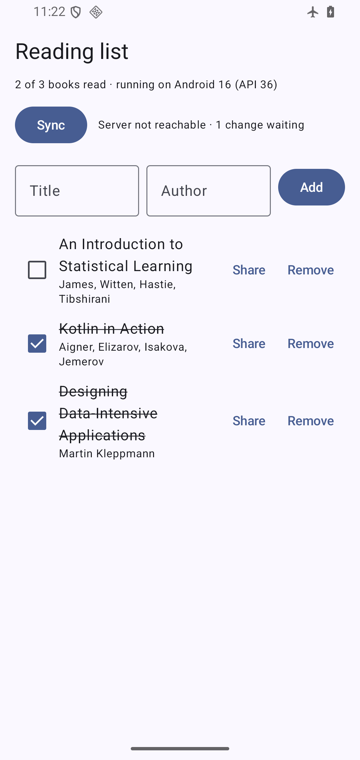
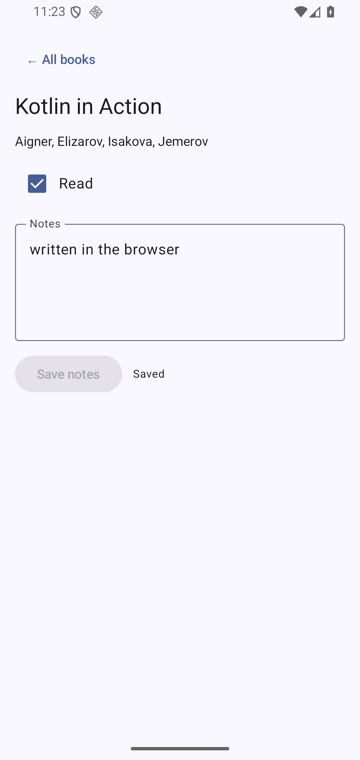
The phone’s tick, made offline, and the browser’s note, made while the phone was away, ended up together, on the phone, on the server and in a browser opened afterwards. Two Android details were needed for it. Android refuses plain HTTP by default, so a network security configuration allows exactly one address, the emulator’s name for the computer it runs on; a real server would use HTTPS and need none. And the app needs the INTERNET permission, which it never needed before.
The app embedded in these posts does not sync: it has no server, so it shows no Sync button, and its Content Security Policy (from the previous post but one) would not let it reach one anyway.
5. The Reading List, Version 7
| Module | Lines | What it is |
|---|---|---|
sync | 57 | the format, the merge, the clock, the server’s store: shared by every target and the server |
server | 19 | Ktor: one endpoint to sync, one to look |
shared, commonMain | 426 | the app, written once: data, sync, state, navigation and UI |
| platform source sets | 35 to 57 each | as before, plus each platform’s Ktor engine and server address |
The app compiles 91.8% (Android), 95.3% (iOS), 94.3% (desktop) and 89.1% (web) of its code from shared source; the server takes three quarters of its code from the same sync module. Sync cost 0.30 MB in the Android release APK (Ktor and OkHttp; 1.52 to 1.82 MB) and 0.12 MB in the compressed web download.
To run it yourself, download the project (reading-list-7.zip, 105 KB):
cd reading-list-7
./gradlew :sync:jvmTest :shared:jvmTest                  # the merge tests and the seven stories, against the real server
./gradlew :server:run                                    # the server, on port 8080
./gradlew :shared:run                                    # the desktop app, syncing with http://localhost:8080
./gradlew :androidApp:installDebug                       # on an emulator: syncs with the Mac as 10.0.2.2
./gradlew :shared:wasmJsBrowserDevelopmentRun            # then open the page with ?server=http://localhost:8080
6. Common Claims, Checked
| Claim | Verdict |
|---|---|
| ”Offline-first just means caching.” | The device’s database is the truth for its screen, and changes made offline must travel later. Measured: a tick made in airplane mode reached the server and the other device. |
| ”Auto-increment ids are fine as identities.” | Two offline devices both created book 4, and one book was lost. |
| ”Delete the row, and sync takes care of the rest.” | The next sync from a device that still had it brought it back. Tombstones keep it deleted. |
| ”Last writer wins is a safe default.” | Per row, it lost a tick to an unrelated note. Per field, it kept both; it still drops one of two edits to the same field. |
| ”Device clocks are good enough for ‘later’.” | A clock an hour slow made a reply lose to the message it answered. A hybrid clock fixed it. |
| ”Retrying a request is harmless.” | Not for operations: “toggle” sent twice is undone. Sending state with timestamps made the retry a no-op. |
| ”Sharing code with the server needs a separate language bridge.” | The same 57-line Kotlin module merges on the phone, in the browser and on the server. |
Summary
| Idea | In one line |
|---|---|
| Kotlin on both ends | :sync (format, merge, clock) is common code; the server is 19 lines around it |
| Identity | A uid per book; fixed uids for the shared sample |
| Deletion | Tombstones, and a deletion wins |
| Merge | Per field, the later change wins; the same function on every device and the server |
| Clocks | A hybrid clock: never behind what the device has seen |
| Retries | State, not operations: sending twice changes nothing |
| Measured | Seven stories against the real server; a phone offline and a browser, merged |
The chapter, in one table
| Post | What it measured |
|---|---|
| What KMP shares | 89.5% of Now in Android KMP’s code in commonMain; what each target ships |
| expect and actual | thirteen mistakes, compiled for every target |
| Room everywhere | one database on four platforms; SQLite in a browser worker |
| State and navigation | what survives rotation, process death and a reload |
| Adaptive UI | two panes from 840 dp; where the web gets its fonts |
| The build | each target’s cost; a 7-second check of every target |
| Offline sync (this post) | seven ways two devices disagree, and a phone back from airplane mode |
| The pipeline, run (a bonus) | CI on every push: the shared tests on the iOS simulator at last |
The project: reading-list-7 (zip) (Kotlin 2.4.21, Ktor 3.6.0, Room 3.0.3, Compose Multiplatform 1.12.2, AGP 9.4.1, Gradle 9.8.1). The demonstration: sync_demo.py. The iOS code was compiled here and not linked or run; the bonus post links it and runs its tests in CI.
References
- JetBrains. Ktor client and its engines; Ktor server.
- Android Developers. Build an offline-first app and Network security configuration.
- Kulkarni, S. S., Demirbas, M., Madappa, D., Avva, B., & Leone, M. (2014). Logical physical clocks. OPODIS. (The hybrid logical clock.)
- Shapiro, M., Preguiça, N., Baquero, C., & Zawirski, M. (2011). Conflict-free replicated data types. SSS. (Why merges that ignore order and repetition can always agree.)
- Kleppmann, M. (2017). Designing Data-Intensive Applications, chapter 5, on replication and last-writer-wins.
- Lamport, L. (1978). Time, clocks, and the ordering of events in a distributed system. Communications of the ACM, 21(7).